What Is Serial Studio? A Tour of the Dashboard App
Serial Studio is a cross-platform app that turns live data from a device into a real-time dashboard. What it does, how the pieces fit, and where to start.

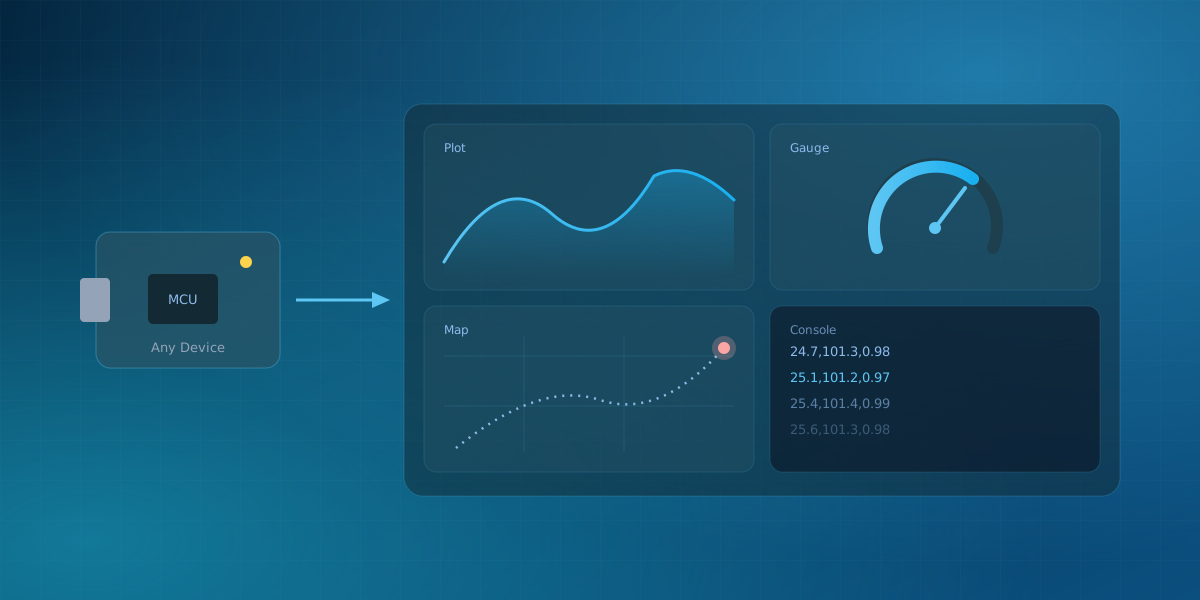
When people first hear the name "Serial Studio," they usually picture a serial-port terminal. That is where it started, but it is not what it is now. Serial Studio is a cross-platform desktop application that takes a live stream of data from a device and turns it into a real-time dashboard: plots, gauges, maps, 3D views, and more. This is a short tour of what it does and how the pieces fit together.
The one idea it is built on
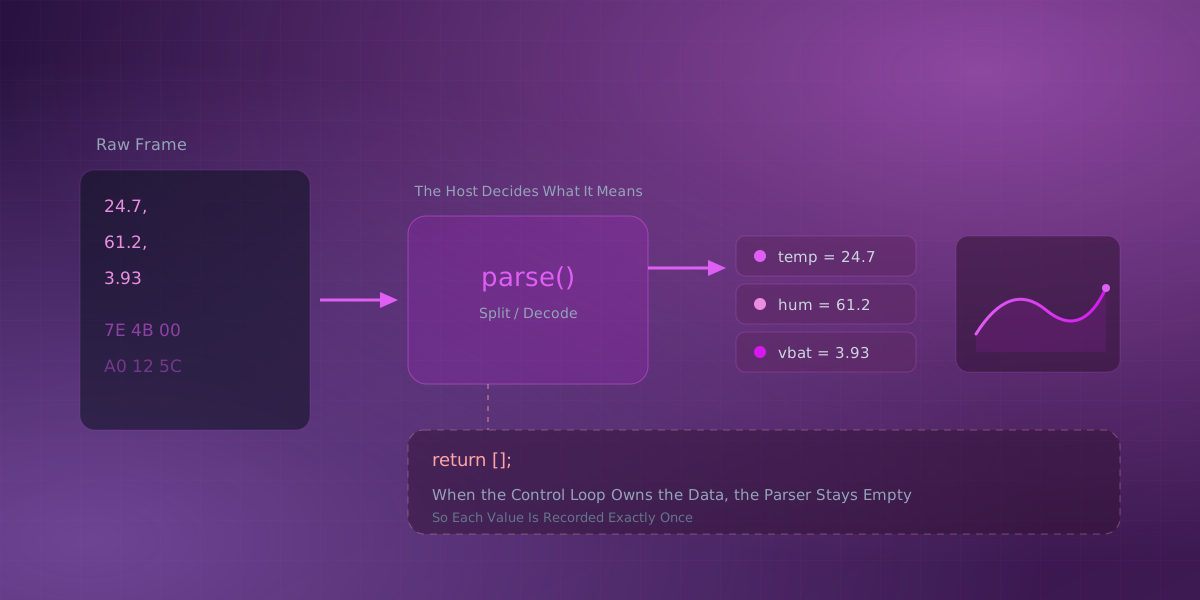
Everything follows from a single decision: the device sends data, and the host decides what that data means. Your firmware's only job is to emit values. The laptop running Serial Studio owns everything about how those values are parsed, displayed, and recorded. That separation is what lets the same tool work with a breadboard one day and a vehicle bus the next, and it is worth understanding early. How Serial Studio Turns Bytes Into Datasets goes deeper on it.
Three ways to use it
Serial Studio has three operation modes, from zero-effort to fully custom:
- Console shows the raw stream. It is a diagnostic view for confirming a device is talking at all.
- Quick Plot reads comma-separated numbers, one line per sample, and draws a live plot for each value with no configuration. It is a quick way to check an Arduino or ESP32 sketch.
- Project File is a dashboard you design on the host: named datasets, chosen widgets, and a frame parser for anything richer than CSV.
You can read more in Operation Modes.
Where the data comes from
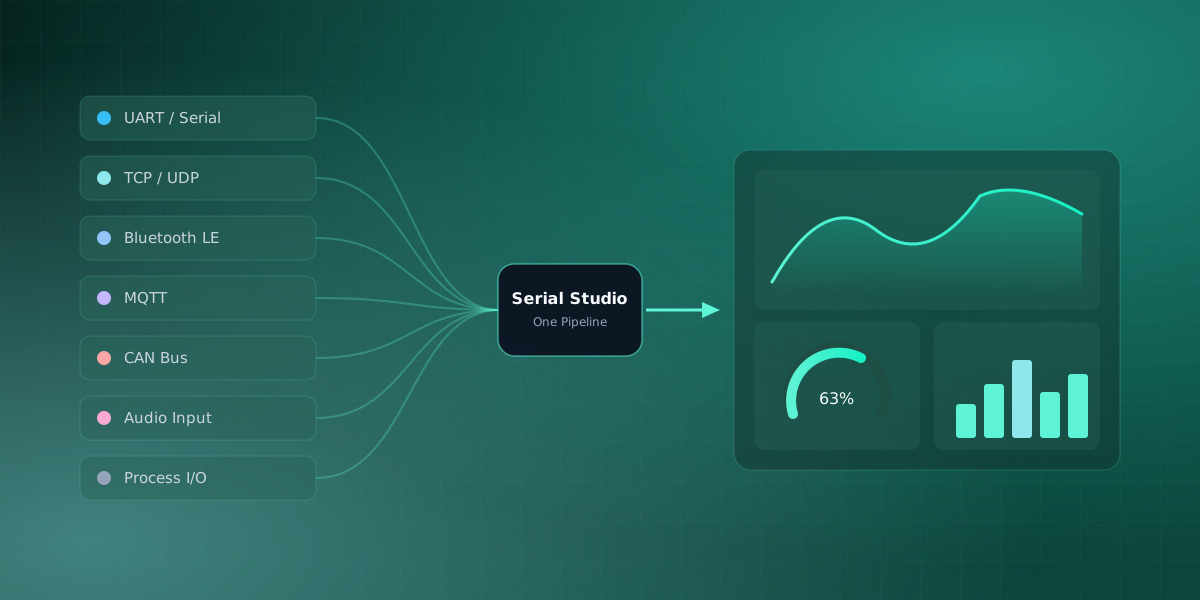
Serial Studio connects through fourteen drivers. Three are in the free edition (Serial/UART, TCP/UDP, and Bluetooth LE); the rest are Pro (MQTT, Modbus, CAN Bus, OPC UA, Siemens S7, EtherNet/IP, IEC 60870-5-104, audio input, raw USB, HID, and Process I/O). Whatever the source, every driver feeds the same pipeline, so the dashboard above it never has to care where the bytes came from, and you can even combine multiple devices on one dashboard. That is why it is much more than a serial tool, which is a topic of its own in Serial Studio Isn't Just for Serial Ports.
What it draws, and how it reads the data
On the visualization side there are 15+ widgets: line and multi-line plots, an FFT, gauges, bars, meters, a compass, accelerometer and gyroscope, a GPS map, data grids, LED panels, and a terminal. Pro adds 3D plots, XY plots, a waterfall spectrogram, a live camera view, and a scriptable canvas for drawing your own widgets.
On the input side, a frame parser turns each incoming frame into an array of values. Parsers come in three forms: built-in templates you configure with a form (no code), and JavaScript or Lua for custom formats. Per-dataset transforms then convert raw readings into real engineering units, which is covered in Calibrate Sensor Data: Counts to Real Units.
Recording and automation
Sessions record to CSV in the free edition, and to MDF4 with a full session database in Pro. Beyond the UI, Serial Studio exposes a TCP API and a gRPC server, plus an MCP server so an AI assistant can drive it. You can automate a whole workflow without clicking anything.
Native, and quiet about it
Serial Studio is a real desktop application built with Qt 6 and C++20, running on Windows, macOS, Linux, and Raspberry Pi. It reads hardware directly, aims to keep a 60 FPS dashboard responsive at high data rates, and collects no telemetry about you.
Free and Pro
The core is free and open source under the GPLv3, and Pro builds on top of it:
| Free (GPLv3) | Pro adds |
|---|---|
| Serial/UART, TCP/UDP, Bluetooth LE drivers | MQTT, Modbus, CAN Bus, audio, raw USB, HID, Process I/O |
| Standard widgets | 3D plots, XY plots, spectrogram, camera, scriptable canvas |
| Project editor, parsers, transforms | File transfer and the AI assistant |
| CSV export and the local APIs | MDF4 recording with a session database |
| GPLv3 terms | Commercial-use license |
The pricing page has the full split, and Pro licenses can be activated offline on machines without internet access.
Where to start
The simplest first run is Quick Plot. Flash an Arduino with a loop that does nothing but Serial.println(analogRead(A0));, select the board's port, and Quick Plot draws that value as a live graph with no configuration. If you are coming from the Arduino IDE, the same move replaces the Serial Plotter. When you are ready for a designed dashboard, the getting-started guide walks through the first project. If you have never worked with a serial port before, How to Read Data From a Serial Port is the place to begin.
Frequently asked questions
Is Serial Studio free?
Yes. The core application is free and open source under the GPLv3, including the serial, TCP/UDP and Bluetooth LE drivers, the standard widgets, and CSV export. Pro adds the advanced drivers, widgets, and recording features listed above; the pricing page shows the split, and Why Serial Studio Has a Pro License explains the reasoning behind it.
What platforms does it run on?
Windows, macOS, Linux, and Raspberry Pi. It is a native desktop application built with Qt 6 and C++20, not a web app, so it reads hardware directly on each platform.
Does it only work with serial ports?
No. The serial port is one of fourteen drivers; the same dashboards work over TCP/UDP, Bluetooth LE, and (in Pro) MQTT, Modbus, CAN bus, OPC UA, Siemens S7, EtherNet/IP, IEC 104, audio, raw USB, HID, and Process I/O. Serial Studio Isn't Just for Serial Ports covers why the name undersells it.
Comments