Serial Studio with STM32 and Raspberry Pi Pico
Serial Studio doesn't care which chip you use. Here's how to stream CSV telemetry from an STM32 over UART and a Raspberry Pi Pico over USB CDC.

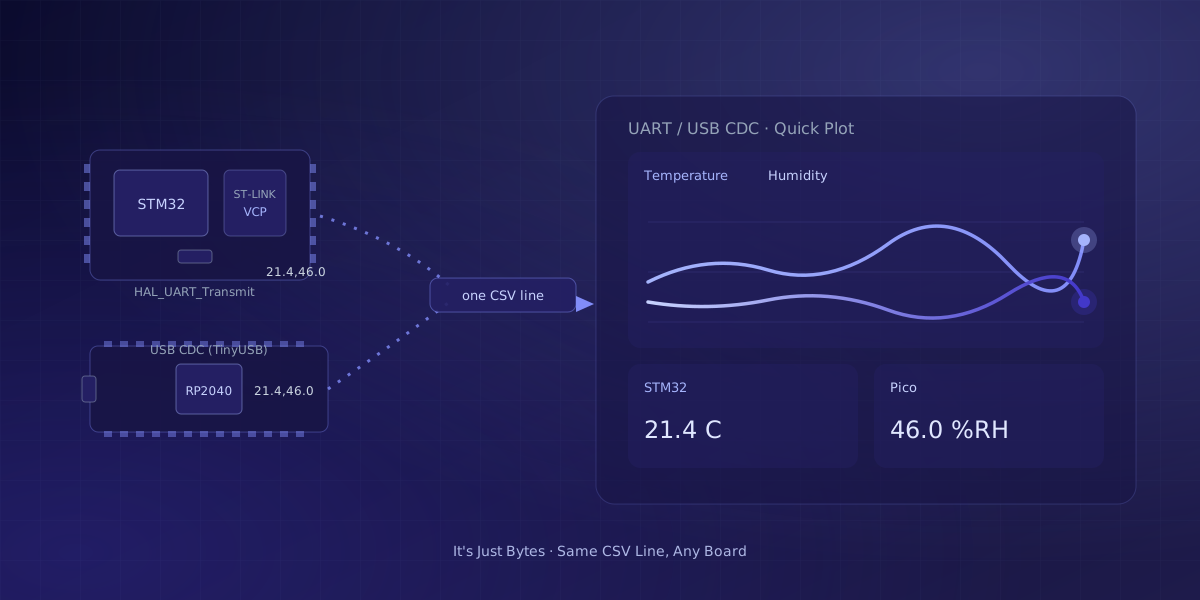
Serial Studio's driver list names Arduino, ESP32, STM32, and plain USB-to-serial adapters in the same breath, and that is not an accident. The app does not know or care which chip put the bytes on the wire; it only reads them. That single fact is why an STM32 board wired for a real project and a five-dollar Raspberry Pi Pico bought for a weekend both work the moment their firmware prints a line of comma-separated values. This post walks through the actual code for both boards, plain HAL or retargeted printf on the STM32 side, and the C SDK's USB CDC stdio on the Pico side, and points out where each board's setup genuinely differs from the Arduino habit most tutorials assume.
Does the microcontroller brand actually matter?
Not to Serial Studio, no. Underneath the fourteen drivers covered in Serial Studio Isn't Just for Serial Ports, the serial/UART driver does exactly one job: open a port at a given baud rate and hand every byte that arrives to the frame parser. It has no branch that asks whether the sender is an ATmega328, an ESP32's Xtensa core, an STM32's Cortex-M, or an RP2040. Bytes are bytes.
What actually matters is the framing, not the silicon underneath it. Quick Plot expects one line of comma-separated values ending in a newline. A custom frame parser can split on any other delimiter you choose. A binary protocol works too, as long as the firmware defines a frame boundary the parser can find. None of the three cares which company printed the chip; they only care what shape the bytes arrive in.
On an STM32, that stream usually rides a UART peripheral configured through HAL or LL, presented to your computer either through a separate USB-to-serial adapter or through the virtual COM port that many STM32 dev boards expose via their onboard ST-Link programmer. On a Raspberry Pi Pico, the RP2040's native USB peripheral speaks USB CDC through TinyUSB, so the board shows up as a plain serial port the moment it's plugged in. UART0 and UART1 are still there too, if you'd rather wire a physical connection instead of using the USB port.
Sending CSV data from an STM32 over UART
An STM32 sends the same CSV line as any other board; only the API changes. HAL_UART_Transmit() moves a buffer of bytes out through whichever UART peripheral CubeMX (or your own register setup) wired up, and it is the most direct way to write the pattern:
#include "main.h"
#include <stdio.h>

extern UART_HandleTypeDef huart2; // whichever USART your project configured

void send_sample(float temperature, float humidity)
{
  char line[32];
  int len = snprintf(line, sizeof(line), "%.2f,%.2f\r\n", temperature, humidity);
  HAL_UART_Transmit(&huart2, (uint8_t *)line, len, HAL_MAX_DELAY);
}
The comma-separated line, ending in a newline, is exactly what Quick Plot expects; the values just happen to leave the chip through HAL_UART_Transmit instead of Serial.println. If you'd rather keep using printf the way the Arduino examples do, STM32 projects commonly retarget it by overriding the low-level _write syscall so every printf call routes through the same UART handle:
int _write(int file, char *ptr, int len)
{
  HAL_UART_Transmit(&huart2, (uint8_t *)ptr, len, HAL_MAX_DELAY);
  return len;
}

// elsewhere, in your main loop:
printf("%.2f,%.2f\r\n", temperature, humidity);
Either version produces the same wire output: a text line, comma-separated, newline-terminated. Once that line exists, everything downstream, Quick Plot or a custom frame parser, reads it exactly the way it reads a Serial.println from an Arduino.
Sending CSV data from a Raspberry Pi Pico over USB
The Pico C SDK makes this shorter, because stdio_init_all() already wires printf to a working serial channel. Set up USB CDC as the backend and every printf call travels the same USB cable you used to flash the board:
#include "pico/stdlib.h"
#include <stdio.h>

int main() {
    stdio_init_all(); // routes printf to USB CDC (or UART, per your CMake config)

    while (true) {
        float temperature = read_temperature();
        float humidity = read_humidity();
        printf("%.2f,%.2f\n", temperature, humidity);
        sleep_ms(100);
    }
}
That's the whole firmware side. read_temperature() and read_humidity() stand in for whatever sensor code you actually write; the part that matters for Serial Studio is the printf line, one text line per sample, values comma-separated. If you'd rather wire a physical UART instead of relying on the USB port, the same board exposes UART0 and UART1, and the SDK's uart_puts writes the same kind of line to a wired connection instead.
Where these boards genuinely differ from Arduino
The firmware pattern is identical, but the road to a blinking cursor is not, and pretending otherwise does readers no favors. Getting an STM32 to the point where it can send its first UART line is a bigger first step than the Arduino IDE's board manager: you're setting up CubeMX or CubeIDE (or a hand-built toolchain and linker script), generating the HAL initialization code, and building against an SDK that assumes you understand clock trees and peripheral handles before you understand your sensor. Arduino and ESP32 hide almost all of that behind Serial.begin().
The Pico sits closer to the Arduino end of that spectrum, just through a different mechanism. Its USB CDC port enumerates as a standard serial device on Windows, macOS, and Linux with no driver install, the same way a native-USB Arduino board does. The practical divide isn't "hobbyist board versus industrial board"; it's whether the board's USB peripheral speaks CDC out of the box. STM32 boards with an onboard ST-Link get a virtual COM port for free once flashed, so after the initial toolchain setup, the day-to-day experience of opening a port and reading lines is no different from any other board on this site.
Reading either stream in Serial Studio
Both boards feed Serial Studio the exact same way once the line reaches your computer: pick the port, match the baud rate, and choose Quick Plot (Comma Separated Values). The app draws one live trace per value on the line, whether that line came from an STM32's UART or a Pico's USB CDC port.
One baud-rate wrinkle is worth flagging, because it trips people moving between the two boards. An STM32's UART, even when bridged through an ST-Link's virtual COM port, is a genuine physical UART underneath, so the configured baud rate has to match what your firmware set with HAL_UART_Init(). A Pico's USB CDC port, like any native-USB serial device, ignores the baud rate entirely; the number in the connection dialog is effectively cosmetic, and data moves at USB speed regardless of what you type there. If a Pico project seems to work at any baud setting, that's why.
Once one board streams cleanly, adding a second is mostly bookkeeping. Serial Studio's multi-device mode can merge an STM32 and a Pico onto one timeline, which is handy when one board owns the sensors and the other handles a display or a motor.
Frequently asked questions
Does Serial Studio need special STM32 or Pico drivers?
No, for either board in the common case. A Pico's USB CDC port enumerates as a standard serial device on Windows, macOS, and Linux without a separate driver. An STM32 board with an onboard ST-Link programmer exposes a virtual COM port the same way; a few older Windows installs may need ST's official VCP driver, but current OS releases generally handle it out of the box.
Can I use binary framing instead of CSV on these boards?
Yes. Neither board changes what a binary protocol needs: a defined frame boundary the parser can find, such as COBS encoding or a fixed-length packet with a checksum. The UART and USB CDC peripherals on both chips are just byte pipes, so the same framing rules that apply to an Arduino or ESP32 apply here unchanged.
Does printing over USB CDC on the Pico work the same in MicroPython?
Yes. MicroPython's print() on a Pico goes out over the same USB CDC interface as the C SDK's printf, so a comma-separated print() line is just as Quick Plot-friendly as the C example in this post. The board-level behavior, no driver, ignored baud rate, doesn't change with the language you flash it in.
What baud rate should I use with an STM32 or a Pico?
For an STM32's physical UART, use whatever your firmware configured with HAL_UART_Init(), since the two ends genuinely have to agree. For a Pico's USB CDC port, the setting is mostly irrelevant, the same as any board with native USB; pick any reasonable value and the connection still works at USB speed.
Comments