What Is Modbus? A Practical Field Guide
A practical introduction to Modbus: registers and coils, RTU versus TCP, function codes, the register-numbering gotcha, and how to read one with no hardware.

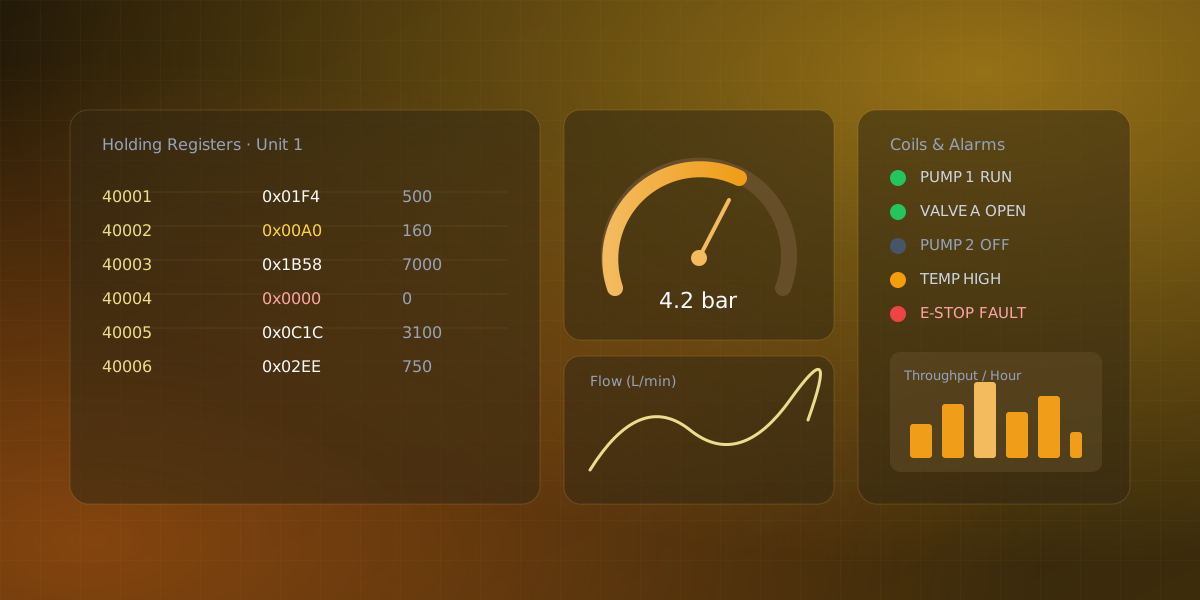
Modbus is a simple request/response protocol in which one master polls registers and coils from many slave devices. It is also one of the oldest protocols still in daily use, and if you work anywhere near factory floors, building automation, or energy metering, you will run into it. It is refreshingly simple once the vocabulary clicks. This is a practical tour of what Modbus is and how to read a device that speaks it.
A protocol from 1979 that never left
Modbus was created by Modicon in 1979 for their programmable logic controllers. Decades later it is a de-facto standard: PLCs, remote terminal units, power meters, and countless sensors expose their data over Modbus, which is why it remains the common language of industrial equipment.
The model is deliberately plain. Modbus is a request/response protocol built around one asker and many responders. A master asks, a slave answers, and that is the entire conversation. (The 2020 revision of the specification renamed those roles to client and server; newer documentation uses those terms, but master/slave is still what you will hear on most factory floors.) There is no streaming and no push. If you want data continuously, the master has to poll continuously.
The memory map: registers and coils
Every Modbus device exposes a flat memory map divided into four tables:
- Coils. Single read/write bits, typically outputs like a relay or a pump-on flag.
- Discrete inputs. Single read-only bits, typically digital inputs like a limit switch.
- Input registers. Read-only 16-bit values, typically live measurements like a temperature.
- Holding registers. Read/write 16-bit values, used for setpoints, counters, and configuration. A request names a function code (what to do, such as "read holding registers"), a starting address, and a count. The slave replies with the values or an error. To read ten measurements starting at address 100, the master sends one request and gets ten registers back. A handful of function codes cover almost every device you will meet:
| Code | Name | Effect |
|---|---|---|
| 01 | Read Coils | Reads one or more read/write coil bits |
| 02 | Read Discrete Inputs | Reads one or more read-only input bits |
| 03 | Read Holding Registers | Reads one or more read/write 16-bit registers |
| 04 | Read Input Registers | Reads one or more read-only 16-bit registers |
| 06 | Write Single Register | Writes one holding register |
| 16 | Write Multiple Registers | Writes a contiguous block of holding registers |
RTU or TCP: same data, different pipe
Modbus comes in two common transports. Modbus RTU runs over a serial line, usually RS-485, and packs the request into a compact binary frame with a CRC. Modbus TCP wraps the same request in a TCP/IP packet over Ethernet. The data model, the register tables, and the function codes are identical. Only the delivery changes. A third transport, Modbus ASCII, encodes each byte as two printable hex characters instead of raw binary, and still turns up on older serial installations even though RTU has mostly displaced it. If you understand one, you understand both.
The gotcha everyone hits: register numbering
Two conventions collide here, and they cause more confusion than anything else in Modbus. Documentation often lists a holding register as 40001, but the address that actually travels on the wire for that register is 0. The leading 4 denotes the holding-register table, and the numbering is one-based, so 40001 maps to protocol address 0, 40002 to 1, and so on. When your values come back shifted by one, this is almost always why.
The second half of the gotcha is scaling. A register is only 16 bits, so a device usually stores a decimal value as an integer. A temperature of 25.1 °C might arrive as 251, meaning tenths of a degree. Larger or fractional values are often split across two registers and reassembled into a 32-bit number. The raw register is never the whole story; you always need the device's register map to know the scale.
Writing to a device
Function codes 06 and 16 turn a Modbus master into more than a passive reader. Write Single Register (06) sets one holding register, the usual way to push a setpoint or a mode command to a PLC, while Write Multiple Registers (16) writes a contiguous block in a single request so several related setpoints land atomically. The same register-numbering offset from above still applies: a write to documented register 40003 lands on protocol address 2 on the wire.
Reading a Modbus device
In practice, reading a Modbus device means polling the right registers on a schedule and turning the raw integers into values you can watch. Serial Studio Pro handles the polling as the Modbus master: you choose the transport (a serial port for RTU, or a host and port for TCP), the unit ID, and for each block the register type (coils, discrete inputs, input registers, or holding registers), starting address, and count, plus a single global poll interval. Each register then becomes a value you map onto a widget, with any scaling handled in a short parser. If your vendor provides a register map as a CSV, XML, or JSON file, the importer can turn it straight into a project.
As with the other buses, you can practice without hardware. Serial Studio's Modbus example includes a PLC simulator, so you can poll registers, watch them update, and lay out a dashboard before you ever connect to a real device.
Modbus does not try to be clever, and that is its strength. Learn the four tables, remember the register-numbering offset, and keep the scale factors handy, and you can read almost any industrial device you meet. And if the machine next to it speaks CAN bus instead, the same read-first approach carries over.
Frequently asked questions
What port does Modbus TCP use?
Port 502. It is one of the older registered ports in industrial networking, and virtually every Modbus TCP device listens there by default. A TLS-secured variant of the protocol exists on port 802, but it is still rare in the field.
What do the different function codes mean?
A function code tells the slave which table to touch and whether to read or write it, and it works the same way on RTU or TCP. In practice, just five or six codes (01, 02, 03, 04, 06, and 16) cover almost every device you will meet in the field.
How do I read a value bigger than 16 bits?
The device splits it across two consecutive registers and your side reassembles the 32-bit integer or float. The catch is word order: some vendors put the high word first and others the low word first, and the specification does not settle it. If a reassembled value looks absurd (a temperature of 4 billion), swap the word order before you doubt the wiring.
Can a Modbus network have more than one master?
Modbus RTU on a serial line allows exactly one master; two pollers on the same RS-485 bus will talk over each other. Modbus TCP is more forgiving because each client has its own TCP connection, so several readers can poll one device at once, subject to the device's connection limit. Multiple writers, on the other hand, are a coordination problem no transport solves for you.
Is Modbus secure?
No. The protocol predates the idea of hostile networks; there is no authentication and no encryption, and anyone who can reach the port can read and write registers. Treat that as a design constraint: keep Modbus devices on an isolated or firewalled network segment and never expose port 502 to the internet.

Comments