Watch an IEC 60870-5-104 Link From a Laptop
How an IEC 104 station interrogation hands you its whole database, what the quality flags mean, and how to test a substation link without a SCADA master.

Most protocols make you say what you want before you can have it. Modbus needs a register map. S7comm needs absolute addresses. EtherNet/IP needs tag names. You arrive with a spreadsheet, or you do not arrive.
IEC 60870-5-104 works the other way around, and once that clicks it changes how you test one. The station tells you what it has. You connect, ask one question, and it answers with its entire database: every information object, with its address, its value, its quality and usually its own timestamp.
The point list is a result of connecting, not a prerequisite for it. That single property is why a laptop is a perfectly good tool for finding out what an RTU is actually reporting.
Where the protocol sits
IEC 60870-5-104 is the network profile of IEC 60870-5-101, which was serial. It runs over TCP on port 2404, and it is what substations, RTUs and SCADA gateways speak across most of European utility infrastructure when there is no OPC UA server in sight.
It is a telecontrol protocol, which means it was designed for a control centre watching a lot of remote stations over links that were once expensive and slow. That heritage shows up everywhere in the design, usually in good ways: it is frugal with bandwidth, it reports by exception, and it is fastidious about sequence numbers.
The handshake, in order
Connecting is more than opening a socket, and knowing the sequence makes failures legible.
- The client opens one TCP connection to port 2404.
- It sends STARTDT act, which asks the station to begin transferring user data. The station replies STARTDT con.
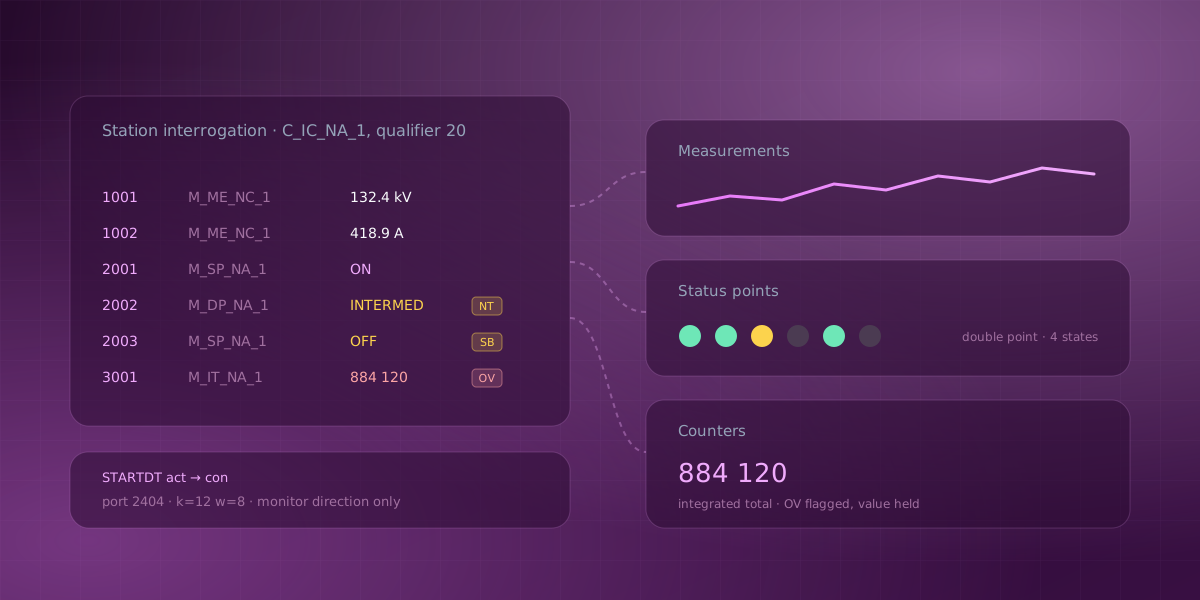
- The client issues C_IC_NA_1 with qualifier 20: a general station interrogation.
- The station answers with its whole database, object by object.
- After the interrogation completes, points keep arriving as spontaneous reports whenever they change.
Both the interrogation and the spontaneous reports update the same channels, so once you are past step 4 the distinction stops mattering.
An idle link is kept alive with TESTFR act frames, and the client answers the station's own test frames in return. A link that goes quiet is not assumed to be healthy.
One implementation detail matters more than it sounds: a client should open exactly one socket and keep what it gets. Many clients probe with a throwaway connection first and dial for real afterwards. A strict IEC 104 station accepts a single client at a time and will count that probe as the client, so the real connection then fails for reasons that look like a network problem and are not. A station that already has a master attached should refuse you outright rather than appear to connect and then go silent.
What actually arrives
The monitor direction defines twelve type identifications that carry process data, each in an untimed form and a CP56Time2a-stamped twin:
| Type | Name | Carries | Timestamped twin |
|---|---|---|---|
| 1 | M_SP_NA_1 | Single point (on/off) | 30, M_SP_TB_1 |
| 3 | M_DP_NA_1 | Double point (off/on/intermediate) | 31, M_DP_TB_1 |
| 9 | M_ME_NA_1 | Normalized measurand | 34, M_ME_TD_1 |
| 11 | M_ME_NB_1 | Scaled measurand | 35, M_ME_TE_1 |
| 13 | M_ME_NC_1 | Short float measurand | 36, M_ME_TF_1 |
| 15 | M_IT_NA_1 | Integrated total (counter) | 37, M_IT_TB_1 |
The double point is the one that surprises people coming from other protocols. It uses two bits to express four states, because a breaker that is transitioning, or whose position indication has failed, is genuinely not the same as "off". Collapsing that into a boolean throws away the information the field engineer most wants.
Both addressing modes of the variable structure qualifier are used in practice. With SQ = 0 each object carries its own address. With SQ = 1 one base address is sent and the objects that follow take the next address each, which is how bulk interrogation replies are usually packed.
A type identification outside that table should be skipped and counted, never guessed at. An unknown type has an unknown element width, so walking its object list would produce values assembled out of the wrong octets. Publishing those would be worse than publishing nothing, because they would look like readings.
Quality is the interesting part
Every point carries a quality descriptor, and IEC 104 is unusually explicit about it. Five conditions are defined:
- IV, invalid. The station is telling you its own reading is untrustworthy.
- NT, not topical. The value is stale; the station has not refreshed it.
- SB, substituted. A human or a system put this value in by hand.
- BL, blocked. The point is held and not updating.
- OV, overflow. On measurands, the value exceeded its range.
These are per point, not a single link-level health flag, and flattening them loses the plot. A counter that wrapped reads as overflow. A value an operator forced reads as substituted, which is exactly the thing you want to notice before you build an argument on it.
The handling that matters: a point flagged invalid should not overwrite the channel. The station has said its reading is not trustworthy, so the last good value stands and the event is counted instead. Drawing the failure as a number would make it look like data, and on a substation trend that is how people reach wrong conclusions confidently.
Sequence numbers and the four tuning knobs
IEC 104 runs a sliding window over numbered frames, and the parameters have terse names:
- k, the send window: at most
kunacknowledged frames may be outstanding. Default 12. - w, the ack window:
wreceived frames oblige an acknowledgement. Default 8. - t1, the send and confirm deadline. Default 15000 ms.
- t2, the acknowledgement deadline. Default 10000 ms.
- t3, the idle test deadline. Default 20000 ms.
Two invariants keep a configuration sane: t2 must stay below t1, and w must stay below k. Otherwise you can ask for an acknowledgement later than the timeout that would already have killed the link, which produces a connection that drops on a schedule for no visible reason.
A frame the link cannot decode, a sequence number that does not follow, or an activation the station never confirms within t1 all end the session. That strictness is deliberate. In telecontrol, a link you cannot fully account for is worse than no link.
It cannot control anything
The client in Serial Studio implements the monitor direction only. There is no control direction at all: no command, no setpoint, no select-before-operate. Connecting it to a live substation cannot change that substation's state.
For this protocol in particular that is not a footnote. IEC 104's control direction can open breakers. A tool that structurally cannot reach it is a different risk conversation from a tool that could but promises not to.
Points, slots and a dashboard
Because points are discovered rather than configured, the generated project comes after the first connection rather than before it. Each information object address is assigned a wire slot the first time the station reports it, and slots are only ever appended, never renumbered, because a generated project's datasets read those slots. The discovered table is remembered between sessions for the same reason.
Create Project from Points then sorts what arrived into three groups: Status Points for single and double points, Measurements for normalized, scaled and float measurands, and Counters for integrated totals. A group only appears if the station reported something for it.
Timestamps follow the station. A point carrying a CP56Time2a stamp is published with the station's own time, mapped onto a local monotonic clock through an offset sampled when the first stamped point arrived. A station whose clock is not synchronised is followed rather than rejected, because what matters downstream is that readings advance at the station's rate. Unstamped or invalid points fall back to receive time and are counted, so you can tell which is which.
Run a station on your own machine
You do not need a substation, an RTU or anyone's permission to see how this behaves. The IEC 104 Example that ships with Serial Studio includes a simulated station: the STARTDT handshake, a full interrogation, short-float measurands and single points, spontaneous updates afterwards, and honest k and w sequence-number accounting.
It is Python standard library only, and port 2404 is above 1024 so no elevated privileges are needed. Open the project and press Connect and the station starts itself; Serial Studio stops it again when you disconnect. To drive it from another client instead:
python3 "examples/IEC 104 Example/iec104_server.py"
It is a genuinely good way to learn the protocol, because you can watch the interrogation populate a point table you never typed, and then watch quality flags change the display without changing the numbers.
Serial Studio's IEC 60870-5-104 driver is part of the Pro build rather than the GPLv3 one, and the fourteen-day trial unlocks it. The simulator page lists the other industrial protocols you can evaluate the same way.
Comments