Protobuf Telemetry Decoding
Imports a Protocol Buffers schema to generate a Lua frame parser and dashboard, then decodes live protobuf telemetry streamed over UDP with per-frame message auto-detection.
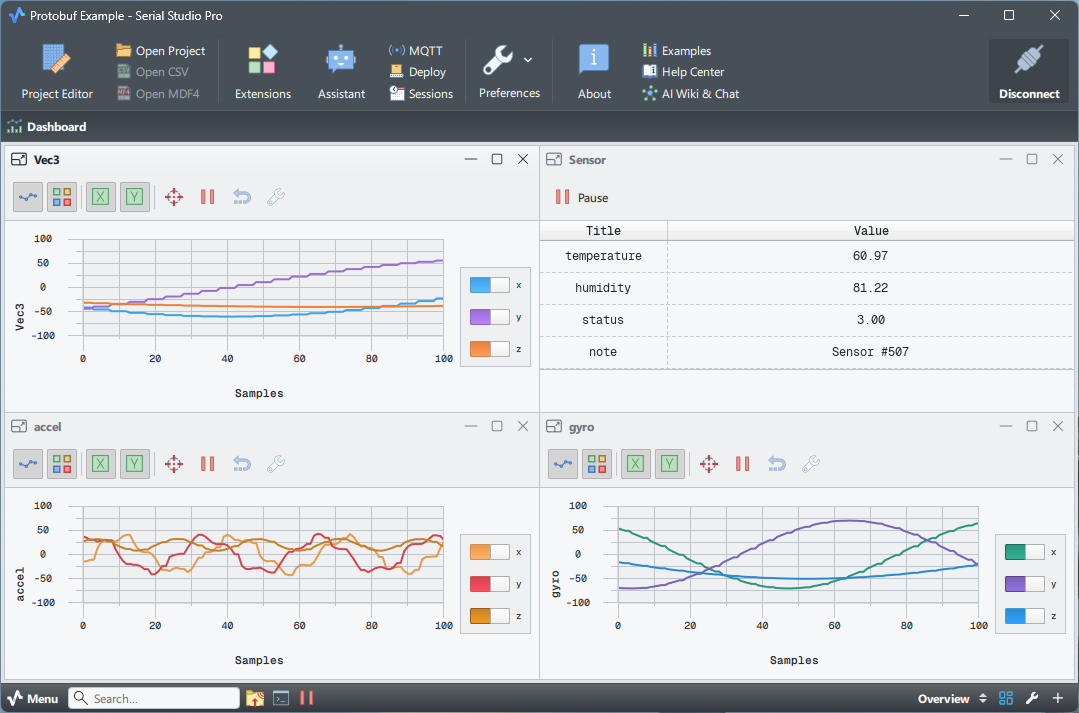
What you'll learn: importing a Protocol Buffers schema, which generates a Lua frame parser and one dashboard group per message, with Data Grid and MultiPlot groups.
Prerequisites: Python 3 for the sensor simulator. Works with the free and Pro builds.
This example shows how to ingest a Protocol Buffers (.proto) schema into
Serial Studio. The Project Editor reads the file and produces:
- A binary source with a Lua frame parser containing one dispatch
table per top-level message + every submessage occurrence. No
libprotobufruntime dependency — the wire-format decoder is inline. - One dashboard group per top-level message, with submessages
appearing as subgroups titled after the parent field (
accel,gyro). - Per-frame auto-detect. Each incoming frame is scored against every top-level dispatch table using field-tag + wire-type signatures; the highest-scoring dispatcher wins and decodes the frame. There is no "primary message" concept and nothing to configure by hand.
- Smart group widgets. Uniform numeric channel blocks (e.g. three floats) become MultiPlots; everything else becomes a DataGrid. Numeric fields auto-enable the plot history so individual Plot widgets and MultiPlots have something to draw immediately.
Works on both GPL and Pro builds.
Quick Start (no hardware required)
The folder includes Protobuf Example.ssproj, the project this walkthrough
produces, already switched to UDP. Open it directly and click Connect:
its control loop launches sensor_simulator.py for you, so you can skip
the import and the manual python3 sensor_simulator.py step. Or follow the
import steps below to generate the project yourself.
1. Import the schema
- Launch Serial Studio.
- Open the Project Editor (toolbar button, or the wrench icon in the device setup panel).
- In the toolbar, expand the Import section and click Protobuf.
- Pick
examples/Protobuf Example/sensor.proto. - Browse the messages in the preview, then click Create Project.
- Save the generated project as
sensor.ssproj.
2. Set the source to UDP
The generated project defaults to UART; the simulator speaks UDP. Open the project's source panel and set:
- Bus Type: Network Socket (or Network (TCP/UDP) in the main Setup Panel)
- Socket Type: UDP
- UDP Local Port:
7878 - Data Conversion Method: Binary (Direct)
- Frame detection: No delimiters
3. Run the simulator
cd "examples/Protobuf Example"
python3 sensor_simulator.py
You should see a live status line like:
Sensor 59B | sent 123 (99 sensor + 24 vec3) | 24.7 Hz | 5.0s
And on the dashboard:
- Sensor (DataGrid):
temperature,humidityanimate;statusbits flip past thresholds;notecarries the running frame counter. - accel / gyro (MultiPlot subgroups under Sensor): three lines each, populated by the embedded Vec3 sub-messages inside every Sensor frame.
- Vec3 (top-level MultiPlot): updates every 5th frame, driven by the bare Vec3 frames the simulator interleaves — proves the auto-detect routes Vec3 frames to their own dispatcher rather than mis-decoding them as Sensor.
How the auto-detect picks a dispatcher
For each frame, the parser walks every top-level dispatch table:
- For each field tag in the frame, check whether the dispatcher knows that tag AND whether the wire type matches what the schema declares.
- Score = matches − mismatches. Unknown tags are ignored, so a small message isn't penalised for not knowing fields it doesn't have.
- The highest-scoring dispatcher decodes the frame. Ties resolve in
declaration order (the message declared first in the
.protofile wins).
Field slots written by the winning dispatcher get fresh values; slots belonging to other messages keep their last reading. This matches protobuf's "missing field = no value" semantics.
Limitation
If two top-level messages share the same first few field tags AND wire
types, the auto-detect can't tell them apart. Wrap such messages in a
discriminator envelope or split them into separate UDP ports. The
example here is intentionally easy: Sensor starts with float (wire
type 5) at field 1, and so does Vec3 — but Sensor carries six
distinct tags vs. Vec3's three, so the score difference is decisive
once the third tag is seen: Vec3's float z against Sensor's
submessage accel (wire type 2).
Files
sensor.proto— proto3 schema withVec3andSensor.sensor_simulator.py— UDP simulator. Hand-encodes the wire format withstruct; no third-party Python packages needed.Protobuf Example.ssproj— the generated project, preconfigured for UDP port7878.README.md— this file.