OPC UA PLC Simulator
Simulated bottling line served over OPC UA (asyncua): filler, capper, pasteuriser and utilities with typed tags, a float array, string status tags and a sensor that periodically reports a bad status.
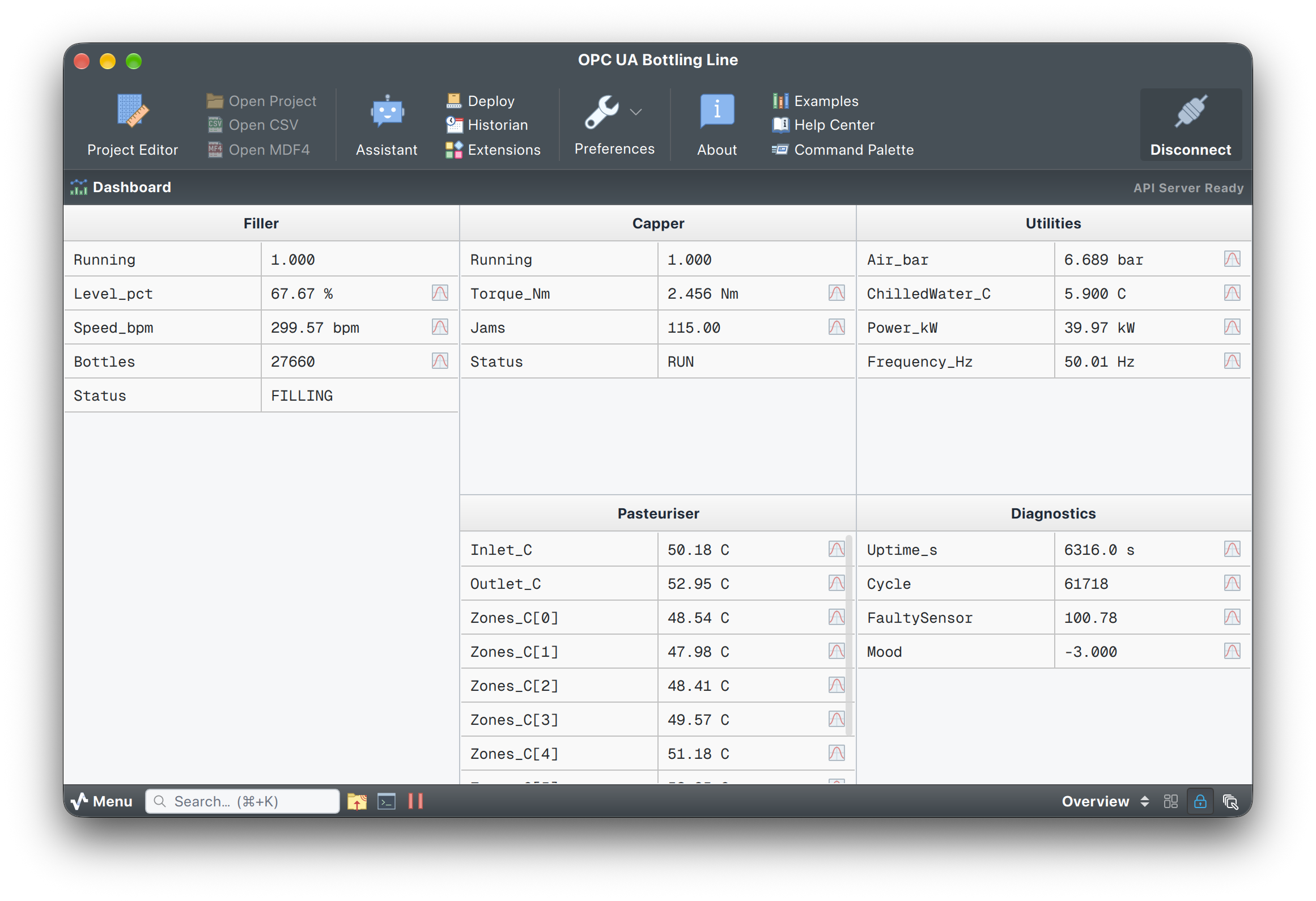
What you'll learn: an OPC UA client source with typed tags, arrays and bad-status handling, a Lua frame parser, and a generated Data Grid dashboard.
Prerequisites: Serial Studio Pro and Python 3 with asyncua.
Overview
This project exercises Serial Studio's OPC UA client with a simulated bottling line served over OPC UA. The simulator is a small asyncua server: a filler with PID level control, a capper with torque feedback and jam counting, a six-zone pasteuriser tunnel, plant utilities, and a diagnostics folder with one sensor that periodically reports a bad status.
The same script doubles as the fixture for the driver's integration tests, so every flag below is exercised in CI.
OPC UA support needs a Serial Studio Pro license. See serial-studio.com for details.
Requirements
pip install asyncua
Running the simulator
python opcua_plc_simulator.py
The server listens on opc.tcp://127.0.0.1:4840/serialstudio/ with security policy None and anonymous login. Flags:
| Flag | Effect |
|---|---|
--port N |
Listen on another port (default 4840). |
--rate HZ |
Update rate of every tag (default 10 Hz). |
--user NAME --password PW |
Require username/password; anonymous sessions are rejected. |
--no-subscriptions |
Refuse every CreateSubscription, so Serial Studio falls back to timed reads. |
--drop-after N |
Stop publishing after N seconds without closing the socket, so the client's silence watchdog has something to notice. |
--security LIST |
Advertise secure endpoints alongside the None one. all offers every policy Serial Studio supports; a comma list such as Basic256Sha256,Aes256_Sha256_RsaPss narrows it. Each policy is advertised in both Sign and Sign & Encrypt. |
--secure-only |
Advertise only Basic256Sha256, with no None fallback, so a client that cannot open a secure channel has nothing to connect to. |
--allow-certificate-users |
Also accept an X.509 user identity token. Any client certificate is accepted; what this exercises is the client's identity plumbing, not a real PKI. |
--cert-expired |
Serve a certificate whose validity window ended yesterday, so the client's "expired" refusal has something to refuse. Written to server_cert_expired.der, leaving the good certificate alone. |
--cert-wrong-host |
Serve a certificate issued for a host this server is not listening on, for the hostname-mismatch refusal. |
--cert FILE --key FILE |
Where the server certificate and key live (default server_cert.der / server_key.pem). They are generated on the first secure run and reused afterwards, so a client that trusted the simulator once is not asked again. |
Connecting over a secure channel
python opcua_plc_simulator.py --security all
Then in Serial Studio: pick a Policy other than None, leave Mode on Sign & Encrypt, and
press Connect. The first attempt is refused because the simulator's self-signed certificate is
unknown, and the trust prompt shows its fingerprint; accepting records the decision and the next
Connect succeeds. Basic128Rsa15 and Basic256 are advertised too, but both are deprecated by the
OPC Foundation and Serial Studio labels them as such.
Address space
Node ids are strings, so they stay stable across restarts (for example ns=2;s=Plant.Line1.Filler.Level_pct).
| Folder | Tag | Type | Notes |
|---|---|---|---|
| Plant/Line1/Filler | Running | Boolean | Conveyor state; stops for 10 s every 90 s |
| Level_pct | Double | PID-held level, setpoint wanders 50-70 % | |
| Speed_bpm | Double | Soft-start toward 300 bottles/min | |
| Bottles | UInt32 | Production counter | |
| Status | String | FILLING, HOLD, STOPPED |
|
| Plant/Line1/Capper | Running | Boolean | |
| Torque_Nm | Float | Follows speed; spikes on a jam | |
| Jams | UInt16 | Jam counter | |
| Status | String | RUN, IDLE, JAM |
|
| Plant/Line1/Pasteuriser | Inlet_C, Outlet_C | Double | First-order thermal model, 62 C target |
| Zones_C | Double[6] | Six tunnel zones; expands to six datasets | |
| Heater_pct | Byte | Heater duty | |
| Plant/Utilities | Air_bar, ChilledWater_C, Power_kW | Double | Slow wander |
| Frequency_Hz | Float | Mains frequency | |
| Plant/Diagnostics | Uptime_s | Int64 | |
| Cycle | Int32 | Simulation step counter | |
| FaultySensor | Double | Reports BadSensorFailure for 5 s out of every 10 s |
|
| Mood | SByte | Signed small integer |
Every value carries a source timestamp from the simulator's clock.
Using the project
- Start the simulator.
- Open
OPC UA PLC Simulator.ssprojin Serial Studio, or select the OPC UA device, enter the endpoint URL, press Discover and Browse Tags..., tick thePlantfolder and press Generate Project. - Connect. Numeric tags plot, booleans drive LEDs, strings show in the data grid, and
FaultySensorkeeps its last good value while the simulator reports the bad status.
From the command line:
SerialStudio --opcua opc.tcp://127.0.0.1:4840/serialstudio/ \
  --opcua-tag "ns=2;s=Plant.Line1.Filler.Level_pct:f64:Level" \
  --opcua-tag "ns=2;s=Plant.Line1.Filler.Running:bool:Running"