NI DAQmx Data Acquisition Bridge
High-performance Python bridge that streams real-time data from NI DAQ devices to Serial Studio in CSV format with support for voltage and current measurement.
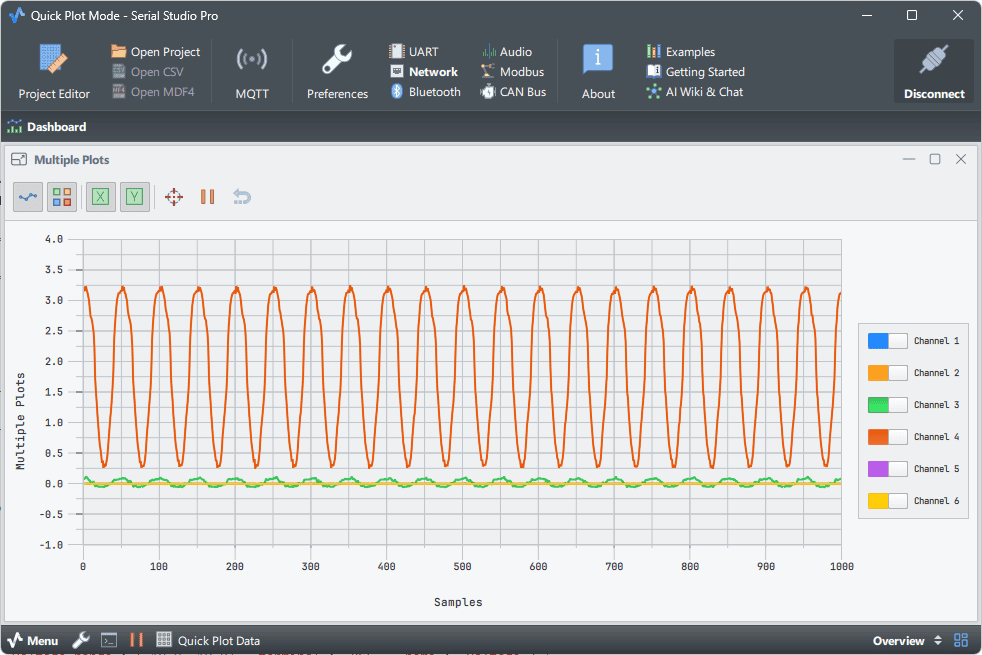
What you'll learn: how a Python bridge streams NI DAQ voltage and current readings to Serial Studio as CSV over UDP, which you can view in Quick Plot.
Prerequisites: an NI DAQmx-compatible device with its drivers, and Python 3.8 or later with numpy and nidaqmx. Serial Studio's free features are enough.
A Python bridge that streams real-time data from NI DAQ devices to Serial Studio (or any UDP listener) in CSV format. Works with any NI DAQ hardware that supports analog input.
Features
- Universal NI DAQ support. Works with USB-600x, USB-621x, PCIe-6xxx, and other DAQmx-compatible devices.
- Voltage and current measurement (current via a shunt resistor).
- Real-time UDP streaming in CSV format (one packet per sample).
- Configurable sample rates, voltage ranges, and terminal configurations.
- Custom processing function for user-defined calculations.
- Low latency single-sample acquisition mode.
Requirements
- Python 3.8+.
- NumPy.
- NI-DAQmx driver (from National Instruments).
- Any NI DAQ device with analog input channels.
pip install numpy nidaqmx
Serial Studio setup
-
Configure the connection:
- In the Setup pane, under Operation Mode, select Quick Plot (Auto-Detected Format).
- Go to Setup → Connection → Network Socket.
- Set Socket Type to
UDP. - Set Local Port to
9000.
-
Connect and run DAQBridge:
python daqbridge.py
Configuration
Edit the top of daqbridge.py.
Device settings
DEVICE_NAME = "Dev1"          # Check NI MAX for your device name
SAMPLE_RATE = 3000.0          # Check your device specs for max rate
SAMPLES_PER_READ = 1          # 1 = lowest latency
Use NI MAX (Measurement & Automation Explorer) to find your device name and confirm supported sample rates.
Channel configuration
The default configuration declares six channels (four voltage, two current). One of each:
CHANNEL_CONFIG = [
    # Voltage measurement
    {"channel": "ai0", "type": "voltage", "voltage_range": (-10.0, 10.0), "terminal": "RSE", "name": "Voltage_0"},

    # Current measurement (I = V / shunt_resistor)
    {"channel": "ai2", "type": "current", "voltage_range": (-10.0, 10.0), "terminal": "RSE", "name": "Current_0", "shunt_resistor": 500},
]
| Parameter | Values | Description |
|---|---|---|
channel |
ai0, ai1, and so on |
Physical channel (device-dependent) |
type |
voltage, current |
Measurement type |
voltage_range |
(-10,10), (-5,5), and so on |
Input range (device-dependent) |
terminal |
RSE, DIFF |
RSE = single-ended, DIFF = differential |
shunt_resistor |
ohms | For current type only |
UDP settings
UDP_HOST = "127.0.0.1"
UDP_PORT = 9000
Sample rate guidelines
Sample rate limits vary by device. Check your device specs in NI MAX.
Example: USB-6001 (20 kS/s aggregate):
| Channels | Max rate/channel |
|---|---|
| 1 | 20,000 Hz |
| 4 | 5,000 Hz |
| 8 | 2,500 Hz |
Example: USB-6210 (250 kS/s aggregate):
| Channels | Max rate/channel |
|---|---|
| 1 | 250,000 Hz |
| 8 | 31,250 Hz |
| 16 | 15,625 Hz |
Custom processing
Edit process_readings() in daqbridge.py to add your own calculations:
def process_readings(raw_data: np.ndarray, channel_config: list) -> np.ndarray:
    output = raw_data.copy()

    # Default: convert current channels (I = V / R)
    for ch_idx, ch_cfg in enumerate(channel_config):
        if ch_cfg.get("type") == "current":
            shunt = ch_cfg.get("shunt_resistor", 1.0)
            output[ch_idx, :] = raw_data[ch_idx, :] / shunt

    # ADD YOUR CUSTOM PROCESSING HERE
    # Example:
    #   output[0, :] = raw_data[0, :] * 2.0  # Scale channel 0
    #   output[1, :] = np.clip(raw_data[1, :], -5, 5)  # Clamp channel 1

    return output
Current measurement circuit
    Load
      │
      ├───[Rshunt]───┬─── AI channel
      │              │
     GND            GND

    Current = V_measured / Rshunt
Troubleshooting
| Error | Fix |
|---|---|
| Device identifier is invalid | Check the device name in NI MAX |
| Sample rate exceeds maximum | Lower SAMPLE_RATE or the number of channels |
| No data in Serial Studio | Check UDP port 9000, and check firewall rules |
| Resource is reserved | Close NI MAX or other DAQ applications |
| Specified route cannot be satisfied | Check terminal config (RSE/DIFF) supported by your device |
Supported devices
Any NI DAQ device compatible with NI-DAQmx, including:
- USB series: USB-6000, USB-6001, USB-6002, USB-6003, USB-6008, USB-6009, USB-6210, USB-6211, USB-6215, USB-6218, USB-6229, USB-6341, USB-6343, USB-6361, USB-6363.
- PCIe series: PCIe-6320, PCIe-6321, PCIe-6323, PCIe-6341, PCIe-6343, PCIe-6351, PCIe-6353, PCIe-6361, PCIe-6363.
- PXI series: PXI-6221, PXI-6229, PXI-6251, PXI-6259, PXI-6281, PXI-6289.
- CompactDAQ: NI-9201, NI-9205, NI-9215, NI-9220, NI-9222, NI-9223, NI-9229.