Command-Based ADC Sampling
Showcases binary data parsing, custom serial actions, timed execution, and CRC-16 checksum validation for Arduino-based sensor data acquisition with FFT analysis.
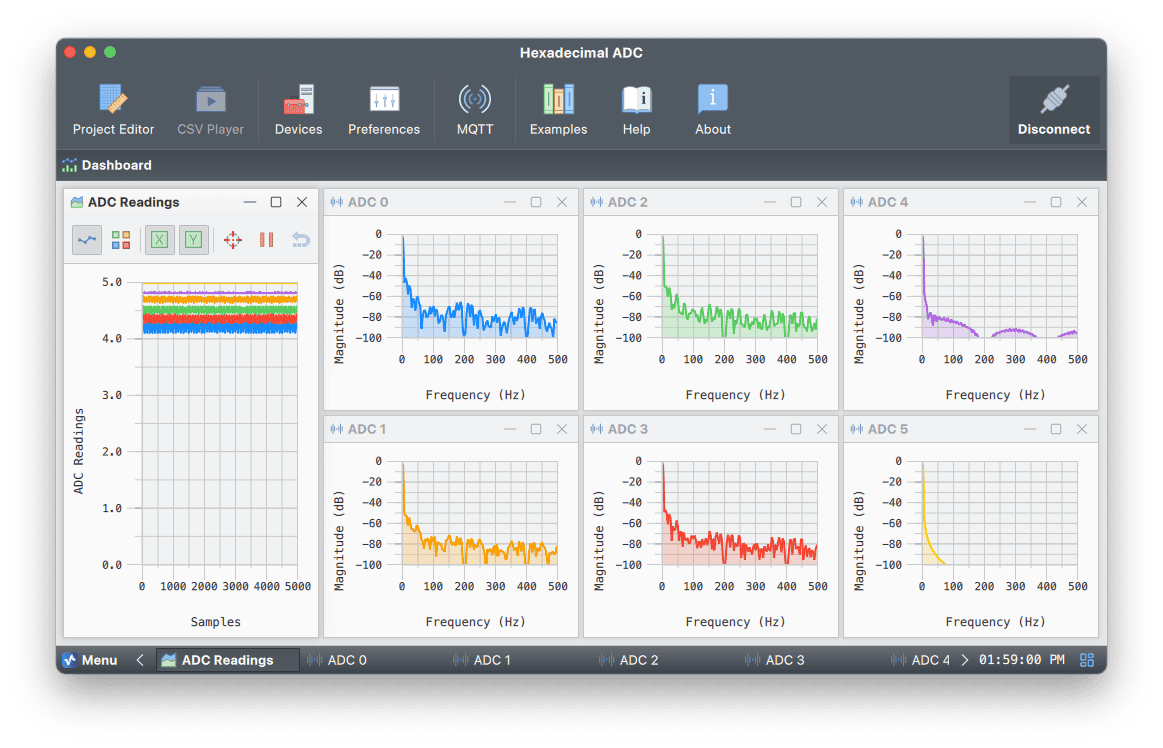
What you'll learn: a binary frame parser with CRC-16 checking, a custom action that polls the device on a timer, and a MultiPlot group with FFT analysis.
Prerequisites: an Arduino board with analog inputs, and the Arduino IDE to upload the sketch. Serial Studio's free features are enough.
Overview
This project shows how to combine binary data parsing, custom serial actions, timed execution, and checksum validation in a Serial Studio workflow with Arduino. It's a full example of a command-driven interface for sensor data acquisition, ready for real-time plotting and FFT analysis.
The Arduino reads analog values from six input channels (A0 to A5), processes them, wraps the result in a binary protocol frame with a CRC-16-CCITT checksum, and only sends data when asked via a custom poll-data command. Serial Studio triggers the command manually or on a timer; this project's Data Polling action toggles a 5 ms timer and starts automatically on connect.
Key features
- Binary data parsing. Efficient, low-overhead serial communication.
- CRC-16 checksums. Integrity check on each frame.
- Actions. Dashboard buttons that send predefined commands.
- Timer modes. AutoStart, Toggle, and Triggered transmission.
- FFT visualization. Analyze analog noise or sensor signals in the frequency domain.
Compatibility
Works with any Arduino board that has analog input pins. No external components needed: floating analog pins produce natural noise, which is ideal for FFT demos.
Hardware setup
Connections
- Leave A0 to A5 unconnected to capture environmental noise.
- Or attach sensors or a function generator for signal injection.
Step by step
1. Arduino sketch (HexadecimalADC.ino)
This sketch configures the ADC, listens for serial commands like poll-data, reads analog values, computes a CRC, and sends data over serial only when asked.
Frame format:
- Start delimiter:
0xC0 0xDE. - Sensor data: 6 bytes (mapped 10-bit to 8-bit).
- CRC-16-CCITT (2 bytes, big-endian).
Baud rate: 115200.
Triggers via Serial Studio actions:
poll-data: read and transmit 1 data frame.enable-pull-up: enable pull-ups on A0 to A5.disable-pull-up: set A0 to A5 to normal input mode.
2. Serial Studio configuration
Frame format:
- Mode:
Binary (Direct). - Frame detection: start delimiter only (the sketch sends no end sequence).
- Start sequence:
0xC0 0xDE. - Checksum:
CRC-16-CCITT.
Datasets. Six channels (ADC 0 to ADC 5) in volts, shown in an ADC Readings multiplot and data grid, with FFT enabled on the plot group.
Actions. HexadecimalADC.ssproj defines three actions, each terminated with \n (the sketch reads commands with readStringUntil('\n')):
Data Polling: sendspoll-dataon a toggled 5 ms timer and starts automatically on connect.Enable Pull-Up Resistor: sendsenable-pull-up.Disable Pull-Up Resistor: sendsdisable-pull-up.
JavaScript frame parser:
/**
 * This function parses a binary data frame (passed as a byte array) and converts
 * each byte into a decimal value scaled from 0 to 5 volts.
 *
 * @param[in]  frame  A JS array of byte values (0–255), passed from C++.
 * @return     Array of floats representing the scaled voltage values.
 */
function parse(frame) {
    let dataArray = [];

    for (let i = 0; i < frame.length; ++i) {
        let byte = frame[i];
        dataArray.push(byte * 5.0 / 255);
    }

    return dataArray;
}
For help on the parser function, see the Serial Studio documentation.
3. Visualize with FFT
- Start Serial Studio and load
HexadecimalADC.ssproj. - Pick the serial port.
- Set the baud rate to 115200.
- Click Connect. The
Data Pollingaction starts on its own and polls every 5 ms; click it to pause or resume. - Use the FFT widget to inspect signal frequency.
Troubleshooting
- No output. Confirm the
Data Pollingaction is running (it toggles on each click). - Noisy values. Normal for floating pins. Connect sensors for more control.
- Invalid frames. Check CRC settings and delimiters.
- Slow updates. Increase the timer rate or switch to manual polling.