ANSI Color & VT-100 Test Suite
Demonstrates Serial Studio's comprehensive ANSI color and VT-100 terminal emulation support for 4-bit, 8-bit, and 24-bit RGB colors.
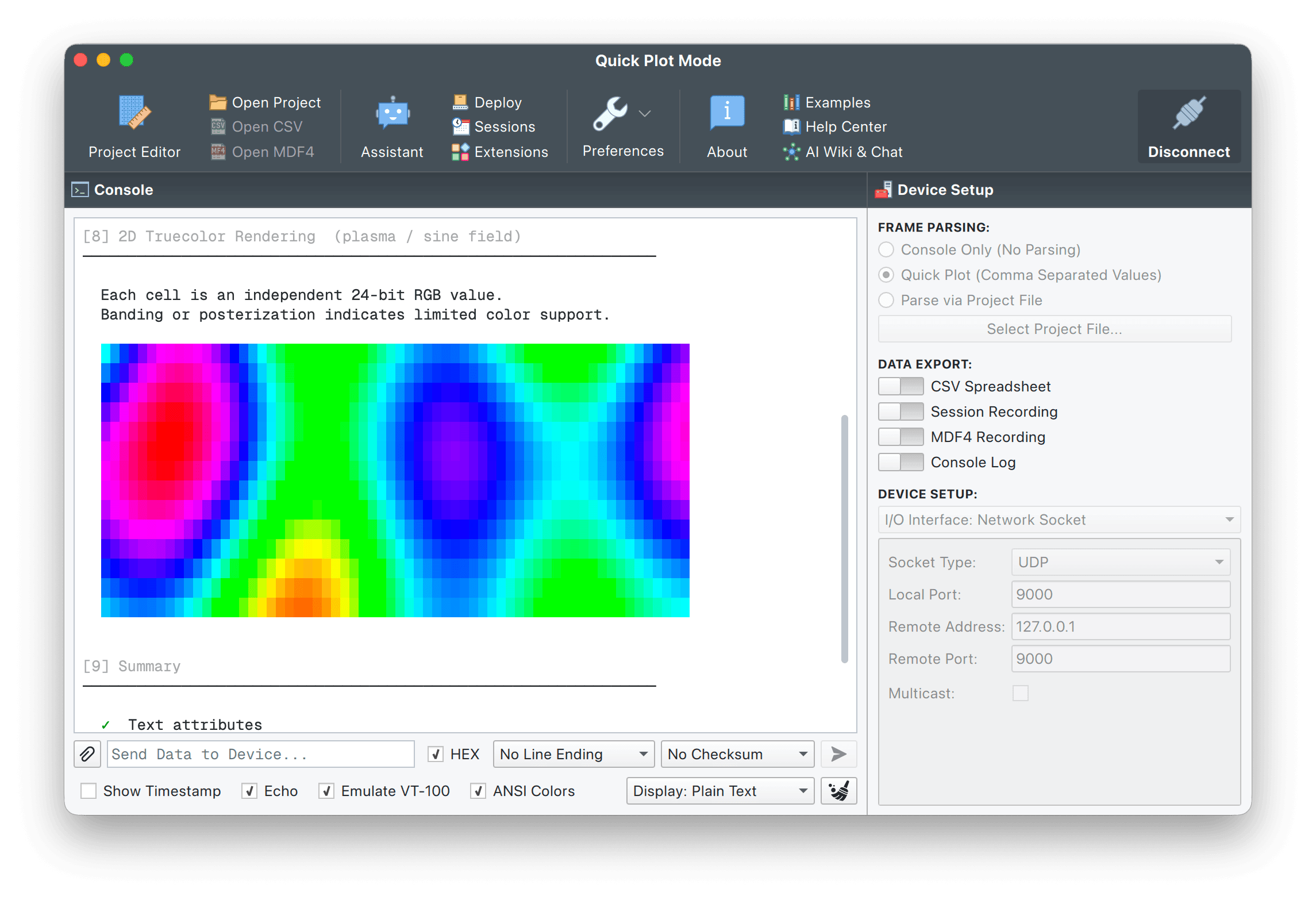
What you'll learn: how the Console renders ANSI color and VT-100 escape sequences (4-bit, 8-bit and 24-bit color, text attributes) sent by a test script.
Prerequisites: Python 3.6 or later. Serial Studio's free features are enough.
This example exercises Serial Studio's ANSI color and VT-100 terminal emulation support.
Features Tested
Text Attributes
- Normal (reset,
\033[0m) and bold (\033[1m, rendered as a lightened color) - The script also sends dim, italic, underline (single, double, curly), blink, reverse, hidden, and strikethrough codes to show that the terminal ignores unsupported SGR attributes and renders plain (or lightened) colored text instead
4-bit Colors (Standard ANSI)
- Standard foreground colors (30-37): Black, Red, Green, Yellow, Blue, Magenta, Cyan, White
- Bright foreground colors (90-97): Bright variants of all standard colors
- Standard background colors (40-47)
- Bright background colors (100-107)
- FG × BG matrix: every foreground rendered over every background
8-bit Colors (256 Color Palette)
- System colors (0-15)
- 6×6×6 RGB color cube (16-231): 216 colors
- 24-step grayscale ramp (232-255)
- Rendered as background swatches:
\033[48;5;Nm
24-bit RGB Colors (True Color)
- RGB foreground:
\033[38;2;R;G;Bm - RGB background:
\033[48;2;R;G;Bm - Full 16.7 million color support
VT-100 Control Sequences
- Cursor up (
\033[1A) and cursor back (\033[3D) with overwrite - Erase to end of line (
\033[K) - Bold + color combinations (other style codes sent by the demo are ignored, per Text Attributes above)
Visual Displays
- 4-bit FG × BG matrix table
- 256-color palette organized display
- Named truecolor swatches with their escape codes (CSS/X11 reference)
- Channel ramps and color gradients (red→blue, green→yellow, cyan→magenta, black→white, navy→orange)
Creative Effects
- HSV hue, saturation, and value sweeps
- Animated 2D plasma field (per-cell 24-bit sine-field rendering)
Requirements
- Python 3.6 or later
- Serial Studio with ANSI colors support
Setup
-
Configure Serial Studio:
- Open Serial Studio
- In the Setup panel, select the Network Socket device
- Set Socket Type to UDP
- Set Local Port to 9000
- Click Connect
-
Confirm ANSI Colors are on:
- Open the Console pane
- Confirm "Emulate VT-100" and "ANSI Colors" are both checked (they're on by default); note that "ANSI Colors" stays disabled until VT-100 emulation is on, so if you had previously turned VT-100 off, re-enable it first
- Optionally check "Show Timestamp" to see colored timestamps
Troubleshooting
- "ANSI Colors" checkbox is greyed out. It only becomes selectable once "Emulate VT-100" is checked.
- No output in the console. Confirm the script and Serial Studio agree on the UDP
port (default
9000) and that no other process is already bound to it.
Usage
Run Full Test Suite
Run the complete test script with all color tests:
python3 test_ansi_colors.py
The script sends a full suite of ANSI color and VT-100 test sequences to Serial Studio via UDP. Watch the console pane to see:
- All color combinations rendered with their ANSI codes
- Background colors behind text
- Rainbow effects and gradients
- VT-100 cursor movement demonstrations
Command-Line Options
You can also run individual test sections:
# Text attributes (bold, italic, underline, ...)
python3 test_ansi_colors.py --attributes

# 16-color foreground, background, and FG x BG matrix
python3 test_ansi_colors.py --4bit

# 4-bit FG x BG color matrix only
python3 test_ansi_colors.py --matrix

# 256-color (8-bit) palette
python3 test_ansi_colors.py --256

# 24-bit truecolor ramps, gradients, HSV sweeps
python3 test_ansi_colors.py --truecolor

# Named truecolor samples (CSS/X11 reference)
python3 test_ansi_colors.py --named

# VT-100 cursor, erase, and attribute sequences
python3 test_ansi_colors.py --vt100

# 2D truecolor rendering test (sine-field plasma)
python3 test_ansi_colors.py --plasma

# Show help message
python3 test_ansi_colors.py --help
How It Works
The script sends formatted test sequences as UDP datagrams to 127.0.0.1:9000. Each test section includes:
- Visual output: Colored text/backgrounds displayed in the terminal
- ANSI codes: The escape sequences used (e.g.,
\033[38;2;255;20;147m) - Descriptions: What each test demonstrates
Color Code Reference
4-bit Foreground
\033[30m  Black          \033[90m  Bright Black
\033[31m  Red            \033[91m  Bright Red
\033[32m  Green          \033[92m  Bright Green
\033[33m  Yellow         \033[93m  Bright Yellow
\033[34m  Blue           \033[94m  Bright Blue
\033[35m  Magenta        \033[95m  Bright Magenta
\033[36m  Cyan           \033[96m  Bright Cyan
\033[37m  White          \033[97m  Bright White
4-bit Background
\033[40m   Black BG      \033[100m  Bright Black BG
\033[41m   Red BG        \033[101m  Bright Red BG
\033[42m   Green BG      \033[102m  Bright Green BG
\033[43m   Yellow BG     \033[103m  Bright Yellow BG
\033[44m   Blue BG       \033[104m  Bright Blue BG
\033[45m   Magenta BG    \033[105m  Bright Magenta BG
\033[46m   Cyan BG       \033[106m  Bright Cyan BG
\033[47m   White BG      \033[107m  Bright White BG
8-bit Colors
\033[38;5;Nm     Set foreground to color N (0-255)
\033[48;5;Nm     Set background to color N (0-255)
Color ranges:
- 0-7: Standard colors
- 8-15: Bright colors
- 16-231: 6×6×6 RGB cube (calculated as: 16 + 36×r + 6×g + b, where r,g,b ∈ [0,5])
- 232-255: Grayscale ramp (24 shades from dark to light)
24-bit RGB Colors
\033[38;2;R;G;Bm    Set foreground to RGB(R, G, B)
\033[48;2;R;G;Bm    Set background to RGB(R, G, B)
Where R, G, B are values from 0-255.
Combined Colors
Multiple codes can be combined with semicolons:
\033[31;47m              Red text on white background
\033[1;32m               Bold green text
\033[38;5;206;48;5;57m   8-bit pink on blue
\033[38;2;255;82;197;48;2;155;106;0m   RGB pink on brown
Reset
\033[0m Reset all attributes (color, bold, etc.)
Example Output
When you run the test, you should see colorful output in the Serial Studio console like:
[2] 4-bit Colors  (16 standard ANSI colors)
────────────────────────────────────────────────────────────────

  Foreground — normal (30–37):
    Black           \033[30m
    Red             \033[31m
    Green           \033[32m
...
Each color will be rendered in its actual color, with backgrounds displaying behind text.
Customization
You can modify test_ansi_colors.py to:
- Change the UDP host/port (
HOST/PORTconstants, default127.0.0.1:9000) - Add custom color combinations
- Adjust timing delays between messages
- Create your own color effects
Technical Details
Serial Studio's ANSI color implementation:
- Color accuracy: Full 24-bit RGB support (16.7M colors)
- Standards compliance: Cursor movement, line erase, and SGR color codes (4-bit, 8-bit, 24-bit) follow VT-100/ANSI X3.64; most text-attribute SGR codes (dim, italic, underline, blink, reverse, hidden, strikethrough) are not rendered
- Background rendering: Separate passes for backgrounds and text to prevent overlap
- Optional: Colors are only processed when "ANSI Colors" is enabled
See Also
- VT-100 Escape Sequences
- 256 Color Palette Reference
- Serial Studio documentation: https://serial-studio.com